CRM & operations
Before you automate: a practical scoping guide for business owners
Before we automate anything, I want you to be able to explain the process without naming a tool. What starts the task, what should happen and who steps in when something doesn’t fit? Those answers matter more than a clever workflow diagram. I’ll show you how we turn one repeated problem into a clear brief, including costs, approvals and tests, so you can decide what’s worth building.

Published · Updated

Describe the work, not the tool
Start with the repeated problem in plain language. New website enquiries are copied into the CRM by hand. Appointment changes are not reaching the receptionist. You spend an hour gathering yesterday's figures. These descriptions explain the work that needs improvement. A request to build an automation with a particular platform does not tell the implementer what a successful result would look like.
Choose one workflow with a clear beginning and end. For example, a submitted enquiry should become a record with the requested service, contact details, source and assigned owner. You should receive a useful notification. If the record cannot be created, a person should be alerted. That is a manageable unit of work with a testable outcome.
Keep a separate list of related ideas. Once people see the first map, they often add reporting, invoicing, AI replies and staff scheduling. Those may be worthwhile later, but combining them immediately makes the original problem harder to solve. A small, dependable automation is usually a stronger foundation than a large demonstration with unclear responsibilities.
Define the event that starts the process
An automation needs a reliable trigger. Be precise about what event should start it and whether that event can happen more than once. A form submission differs from a contact being created. A booking request differs from a confirmed appointment. A customer replying to a message differs from a staff member editing the record.
Ask where the event comes from and what it contains. Does it identify the customer, the service and the relevant opportunity? Does it include the date in a consistent timezone? If a field is absent, will the workflow stop for review or apply a clearly agreed default? Missing information should not silently become invented information.
For a hypothetical roofing company, an inspection booking may be the trigger for a preparation message. A later reschedule should update the appointment details without sending the original confirmation again. Defining both events at the beginning helps the implementer avoid duplicate or contradictory messages. The trigger is not a minor technical detail; it determines when the business acts.
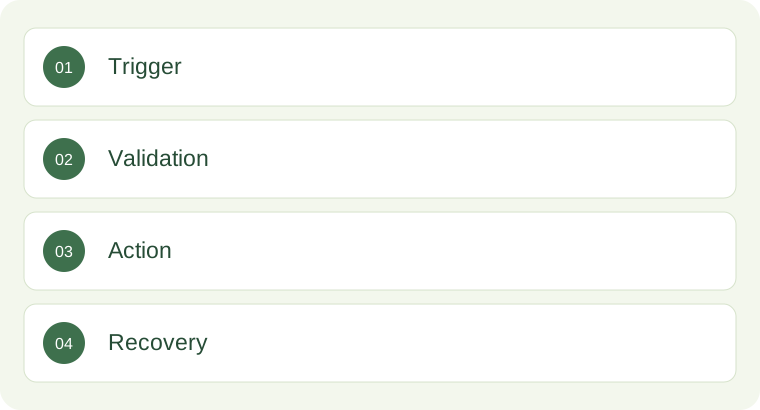
Agree the decisions and the human checkpoints
Some steps are straightforward routing. An enquiry for a particular suburb can be assigned to the relevant estimator if the service area has been agreed. Other steps require judgement, such as confirming a complex scope, assessing urgency or deciding whether an unusual customer request can be accommodated. Do not hide those decisions inside an automation just because the software can make an assumption.
Identify where human review should occur. A system can prepare a draft response, gather supporting details or suggest the next action, while a person approves the final decision. This is especially important for customer commitments, pricing exceptions, specialist advice and changes that affect delivery. You should know which actions happen automatically and which remain pending approval.
If AI is involved, define its role narrowly. Drafting a summary is different from agreeing a quote or promising an appointment. Specify the information it may use, the fields it may update and what it should do when it is uncertain. A confident-sounding output is not evidence that the underlying information is correct.
Treat exceptions as part of the design
Most automation demonstrations show the easiest case: complete information, working connections and a customer who follows the expected path. Real operations include missing details, duplicate records, delayed updates and unavailable systems. Planning for these conditions is part of delivering the workflow, not an optional improvement after something fails.
Write a short exception table. Include the situation, the safe response, who is notified and what the customer sees. If a connection is unavailable, perhaps the enquiry waits in a review queue while the team receives an alert. If two records match the same person, perhaps the system requests review instead of combining them automatically. The right response depends on the business.
HighLevel's webhook guidance describes event notifications and delivery handling. The business implication is simple: an attempted message between systems does not establish that the desired operational result occurred. Ask how success is confirmed, how failed events are detected and how a person can safely retry the work without creating duplicate customers or repeated messages.
Keep the information small and well defined
An automation becomes easier to understand when every field has an agreed meaning. Name, preferred contact method, service requested, location and next appointment are useful examples. Free-form notes can carry context, but they should not be the only source for information that drives important decisions. A suburb buried in a long message is harder to route consistently than a verified service-area field.
Decide what should not move. A marketing handoff may need a booking status without needing detailed clinical notes. A staff notification may need a service address without exposing every document held about the customer. Use access appropriate to the person's role and establish how sensitive information will be handled before connecting systems.
Also decide which record is authoritative. If two systems store the appointment date, identify which one controls changes and how the other is updated. Otherwise, an old value can overwrite a correction. A field map should explain the source, destination, transformation and owner, so the business can understand the connection without reading implementation code.
Estimate value using the whole operating cost
A useful automation brief includes a sensible reason to build it. Estimate how often the task occurs, how long it takes, what errors it creates and what a failure costs operationally. Do not assume every saved minute becomes profit. Some time will be used for review, exception handling and keeping the workflow accurate as the business changes.
Consider a hypothetical business that manually creates forty enquiry records each week. If each record takes three minutes, the activity occupies about two hours. Automating the transfer may reduce that work, but the team still needs to check exceptions and maintain the process. The value may be greater reliability and faster assignment as much as a direct reduction in administration.
Include setup, platform charges, usage costs, support and maintenance in the decision. Ask what happens when a connected vendor changes a field or permission. An inexpensive build with no monitoring can create more work later. You need to understand the ongoing responsibility, rather than comparing only the initial price of one implementation against another.
Specify acceptance tests before launch
Write tests that reflect the promise being made. A valid enquiry should create one correct record. A repeat submission should follow the duplicate rule. A cancelled appointment should stop the relevant reminder. A failed connection should create a visible exception. These tests make completion concrete and reduce disagreement about whether the workflow is ready.
Include the team member who will use the result. Ask them to find the new record, complete the next action and explain the status without help. If they cannot do that, the automation may be technically successful but operationally incomplete. Labels, notifications and instructions matter because they determine whether the receiving person can act confidently.
Use clearly labelled test records and controlled destinations. The test should not accidentally contact real customers, issue live invoices or change production commitments. Record what was tested and what remains outside scope. A launch checklist is more useful when it contains evidence of the expected behaviour, rather than a row of unchecked assumptions about what the integration should do.
A helpful final exercise is to explain the proposed workflow to someone who does not know the software. Ask them to identify the starting event, the decision being made and the person who handles a failure. If the explanation depends on unexplained tool names, simplify the brief. You should be able to understand the business behaviour being approved, even when the technical implementation is delegated to a specialist. Clear approval begins with a process that can be described clearly.
Give the workflow an owner after launch
Someone must notice when the workflow stops doing its job. Nominate an operational owner, an implementation contact and a review schedule. Decide where errors appear and how quickly they should be reviewed. A quiet automation is not necessarily a healthy one; it may have stopped receiving events or lost access without anyone seeing an obvious failure.
Keep a short operating guide with the workflow's purpose, trigger, main steps, exceptions and fallback. Include how to pause it safely. When staff change roles or a connected system is replaced, the guide helps the business understand what depends on that process. Documentation should support everyday continuity, not merely satisfy a handover requirement.
We can map and build automations around enquiry capture, follow-up, bookings, reporting and the agreed delivery workflow. We first establish the business rules and supported connections, then test the handoffs with your team. The aim is reliable assistance for a clear process, with people accountable for the decisions and exceptions that still need human attention.
Let’s put this to work in your business
Pick one repetitive task your team wants off its plate. I’ll map the starting event, rules, human checks and failure route with you. Before we build, we’ll agree what success looks like and how you’ll test it. That gives you a concrete automation scope and an ongoing owner, rather than a collection of connections nobody is responsible for maintaining.
KEEP READING

Give every missed enquiry a clear next step
When someone calls and nobody answers, I don’t want your team guessing who should call back. I want one record, one responsible person and a clear next action.

Connect your enquiry process without replacing everything
You don’t need to replace software that already works just because you want better marketing. I’d rather start with the handoff that’s missing.

Choose a CRM that fits your business before replacing what already works
If your team already has software it trusts, I won’t ask you to throw it away just to use our CRM. First, I want to see where enquiries get lost, where people repeat work and which system owns each decision.